Using sql developer 3.1.x versions, I was constantly getting ‘Io Exception: The Network Adapter could not establish the connection’ (ORA-17002) error. This happens on specifically when connected to certain wired-network (LAN).
Scenario and versions,
– mac OS X 10.7.x (haven’t checked other versions)
– SQL developer 3.1.x
– wired-connection (LAN)
There were 2 work arounds that I found.
1) Connect via wi-fi and use VPN (cisco anyconnect) and then try to connect to the database
2) Use the older “ojdbc6.jar” file. The file that is used to connect to database. The .jar file from older sql developer version 2.1.1.64 works without any errors. So I renamed this .jar file that came with sql developer 3.1.x version and copied the older .jar file in this location. See screenshot below,
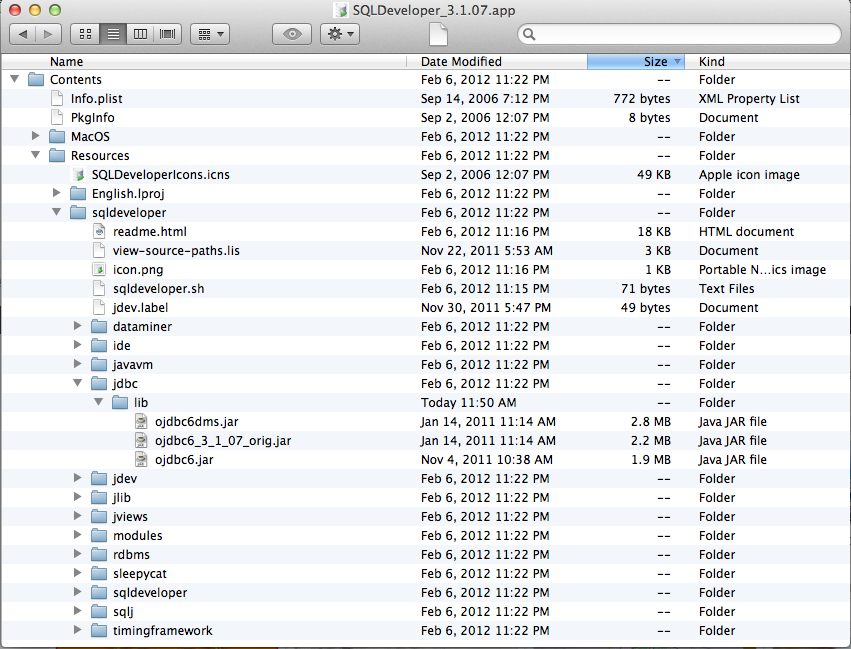
Note: To get this file location, right-click on SQLDeveloper.app –> show package contents
I think “option 2” works best for me because I want a stable and faster wired connection at my office. Hope this helps for someone looking for a workaround.
 tajsblog